There are many variables that go into selecting the right screen for a specific installation: room size, architectural elements, projector type, throw distance, lighting…and the list goes on! Da-Lite now offers our Screen & Surface Selection Tools online to easily explore our complete portfolio of products.
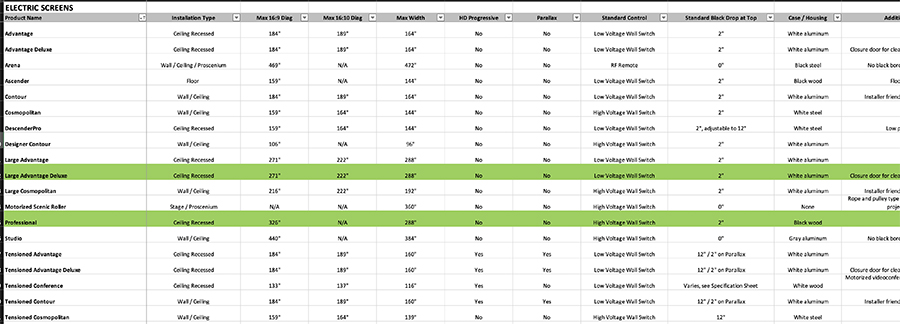
The latest addition to www.legrandav.com includes simple workbooks to guide users through various considerations of selecting the right screen for each application. Selection workbooks (Excel) can be downloaded and each category filtered to arrive at an appropriate list of screen and surface options.
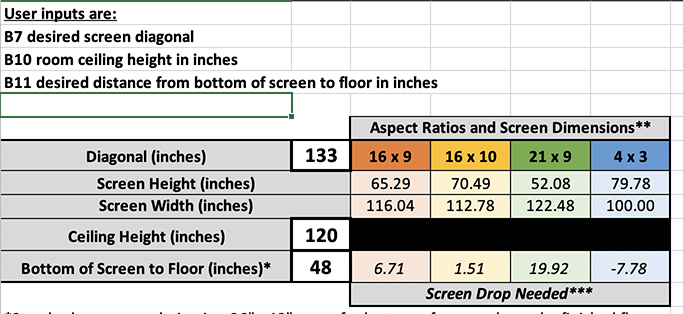
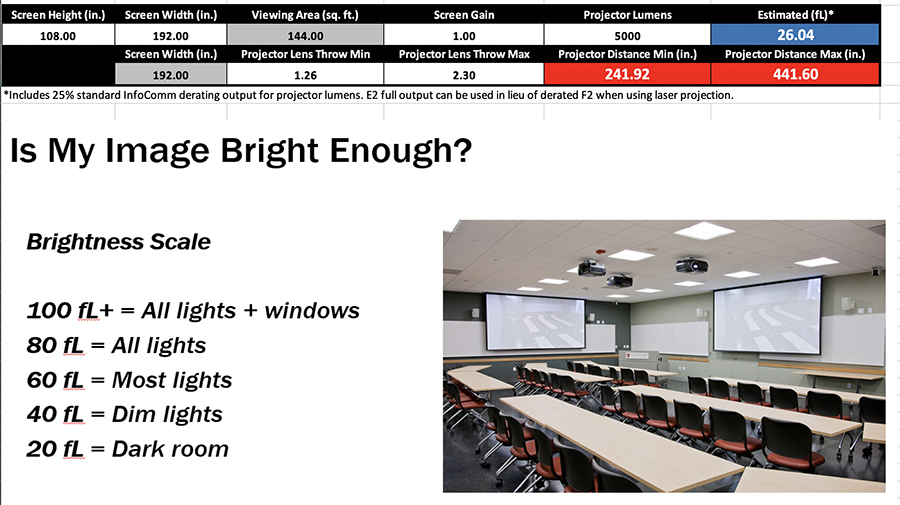
Calculator workbooks are also available to help determine correct aspect ratio, size and surface brightness based on room dimensions and projector type.
The new webpage includes a variety of other tools and training resources including a Surface Decision Tree (PDF), plus links to the Da-Lite YouTube page, Catalogs & Brochures, Customer Support and AV University. For those already familiar with a specific Da-Lite screen needed for their installation, Screen Designer is an excellent tool to design and customize products. And, the Da-Lite Design Center is always happy to lend a hand in transforming your vision into reality.
Take the guesswork out of choosing the right screen for every installation with tools and support from Da-Lite.


